Three Letters and a Bet: Ubuntu 26.10 Ships a Kernel That Wasn't Finished, a Desktop With No Legacy NVIDIA — and the Last GNU Holdouts Fall to Rust

On October 15, Canonical shipped Ubuntu 26.10, codename "Stonking Stingray" — and if the name sounds like British slang for "impressively big," that's because it is. Fitting, because this interim release is quietly one of the most consequential Ubuntu builds in years. It ships with a kernel that wasn't even stable when the ISO was pressed, the newest GNOME desktop, a 22-year-old D-Bus implementation shown the door, and the final three holdouts of the GNU command line — cp, mv, and rm — finally swapped for Rust.
Here's everything that matters, and whether you should actually install it.
The Headline: Three Command Letters, One Completed Migration
The big story isn't a feature you click — it's the completion of Ubuntu's "oxidation" project, the plan to replace battle-tested GNU C utilities with memory-safe Rust rewrites from the uutils project.
The road here was longer than Canonical expected:
| Release | What happened |
|---|---|
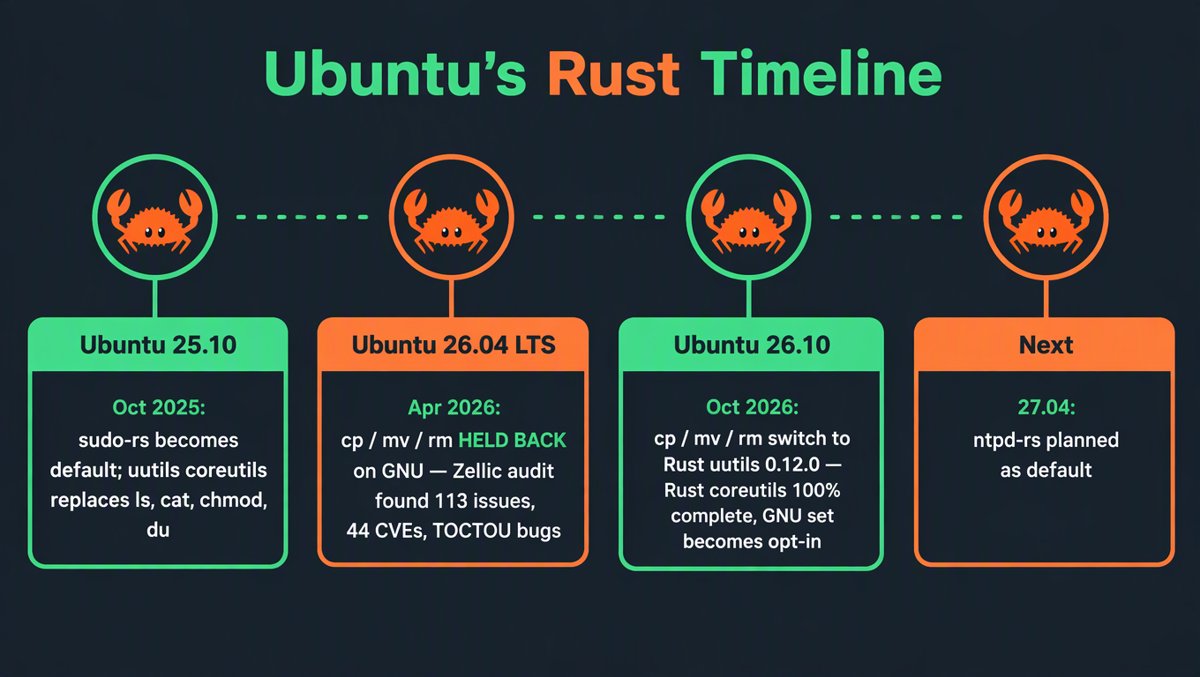
| Ubuntu 25.10 (Oct 2025) | uutils coreutils became the default for most tools (ls, cat, chmod, du…). sudo-rs also became the default sudo. |
| Ubuntu 26.04 LTS (Apr 2026) | cp, mv, rm held back on GNU versions — a crop of TOCTOU (time-of-check-to-time-of-use) bugs blocked them. |
| Ubuntu 26.10 (Oct 2026) | The last three holdouts move to uutils. The Rust coreutils migration is 100% complete. GNU versions become an opt-in package. |
The reason cp, mv, and rm lagged behind is worth understanding, because it's a story about replacing software that had run the world's servers for decades. Canonical commissioned security firm Zellic for two audit rounds (December 2025 – March 2026), prioritizing the most security-sensitive utilities. Zellic raised 113 issues, 44 of which were assigned CVEs. The TOCTOU class of bugs — where a file's state changes between checking it and acting on it — was exactly the kind of subtle filesystem race condition that a fresh rewrite can get subtly wrong. Canonical refused to ship them until they were fixed upstream.
The final stretch wasn't clean, either: in July, the uutils version of cp entered the archive and was pulled straight back out after it broke live image builds. It was flagged "Critical," fixed upstream, and landed in time for the release. On a stock 26.10 install, every standard core utility now reports the uutils coreutils 0.12.0 banner.
What actually changes for you? In theory, nothing. uutils treats any divergence from GNU behavior as a bug, and the commands look and feel identical. In practice, some options may still be missing or behave differently in edge cases — which is exactly why the audit existed. If you're attached to the originals, install the coreutils-from-gnu package and carry on like it's 2009. Note that find, xargs, rsync, and tar are not part of coreutils and were never affected.
The rustification pipeline keeps flowing: ntpd-rs (the Rust NTP daemon) enters 26.10's testing archives, with a planned default switch in 27.04 next year. Canonical also became a Gold Sponsor of the Trifecta Tech Foundation (€40,000/year) to fund closing ntpd-rs's feature gap with chrony — multi-threaded NTP servers, GPSd support, AppArmor and seccomp hardening.
The Kernel Gamble: Linux 7.3, Pressed Before It Was Finished
Ubuntu switched its kernel-selection policy in 2024: ship the newest upstream kernel available at release freeze, even if it's still a release candidate. For 26.10, Canonical took that to its logical extreme.
The plan announced in late August was Linux 7.2. Then, on September 1, the kernel team bumped the target to Linux 7.3 — because upstream's 7.1 and 7.2 cycles had zero delays, making 7.3 feasible. The catch: kernel freeze landed October 1, while Linux 7.3's stable release was expected October 18 or 25 — after Ubuntu's October 15 GA date.
Ubuntu's official release notes state it plainly: the release images carry a pre-release 7.3.0-… kernel snapshot; the final upstream 7.3 lands via updates after GA. Canonical bet that a late RC is 95% identical to final, and that daily kernel updates would close the gap within days. For an LTS release, this would be reckless. For a nine-month interim release — which exists precisely to stress-test things before 28.04 LTS — it's the system working as designed.
What's actually in 7.3:
| Area | What changed |
|---|---|
| Scheduler | ByteDance's SMP scheduler overhaul restructures scheduling queues — reported ~90% reduction in scheduling latency in relevant workloads |
| Gaming (old hardware) | Phoronix benchmarks showed minimum frame rates jumping from ~4 to ~29 FPS in a specific test on decade-old hardware (i7-2600K + RX 580). Workload-specific — not a universal 7x gaming upgrade |
| Filesystems | Faster Btrfs across the board (Phoronix testing); BPF verifier hardening |
| New silicon | AMD Zen 6 Ryzen client enablement; Intel Xe3P "Nova Lake" integrated graphics stable + default |
| Quirky extras | Steam Controller (2026 refresh) initial driver support; KSMBD gains Apple Time Machine backup interoperability; Ryzen AI Halo LED/RGB driver |
There's also a fun footnote: Linux 7.3-rc2 (September 6) was unusually heavy on patches, and Linus Torvalds joked in the release announcement, "rc2 is heavier than usual. I'm going to blame AI. That's my story and I'm sticking to it." The kernel tree now sits at roughly 41 million lines of code, and the AI-assisted patch firehose is visibly straining review capacity — a theme this newsletter has covered from several angles lately.
GNOME 51: The Refinement Release With One Landmine
26.10 ships GNOME 51, released upstream September 17. It's a refinement, not a redesign — but it packs one genuinely important change:
⚠️ Mutter drops support for legacy NVIDIA drivers. The window manager now targets only the modern GBM/DMA-BUF graphics stack. If your card needs an old legacy driver branch, 26.10 will not be kind to it. Check nvidia-driver-580 compatibility with your hardware before upgrading — this is the single most likely way to break your day.
Otherwise, GNOME 51 is a pile of quality-of-life wins:
- FIDO2 passkey login and a rebuilt Mutter frame scheduler
- Native background blur via the new
ext-background-effect-v1Wayland protocol — previously the exclusive territory of extensions like Blur My Shell - A dedicated fingerprint-management UI, an explicit reduced-motion accessibility option, and a floating search overlay that no longer hijacks your whole overview
- Shell polish: screenshot selections stretch to monitor edges, the power-off dialog's "Install Updates" checkbox is back, monitor brightness persists across sessions, and the mic icon only lights up while you're actually recording
- Settings drops the now-pointless "Windowing System" field (it's Wayland; everything is Wayland), and the Software app warns you before installing an app that's already reached end-of-life
Myna: Local AI Voice Typing, No Cloud Required
Ubuntu's first concrete deliverable from its April AI strategy is Myna — a push-to-talk dictation tool, not a chatbot. Hold a hotkey, speak, and transcribed text lands at your cursor. Recognition runs entirely on your machine through a sandboxed component called the Canonical Inference Snap, with multiple model sizes matched to your hardware. Audio is processed in memory and discarded; the mic is only touched when you trigger it. GPLv3, validated for Wayland + GNOME first.
It's deliberately modest — this is "voice typing," not "AI assistant" — but architecturally it matters: local-first inference on open-weight models is the explicit plan, with the bigger Context-Aware Desktop work targeting 28.04 LTS. In a period when every OS vendor is shoving a cloud assistant at you, Canonical is shipping a dictation tool that works on a plane. Genuinely refreshing.
The Invisible Work: dbus-broker, Mesa 26.2, and Old Friends Retiring
- dbus-broker replaces dbus-daemon — the D-Bus implementation Ubuntu has shipped since its very first release in 2004. The old daemon can drop messages under heavy load and queries targets sequentially; dbus-broker is asynchronous and event-driven by design, and it's already the default on several other distros. (Note: one blog claims dbus-broker was already default in 26.04 — Canonical's own roadmap and multiple sources place the switch in 26.10.)
- Mesa 26.2 graphics stack, and GStreamer 1.30 with new Rust-based plugins
- RISC-V gets a full desktop experience on RVA23-compliant hardware — the most complete RISC-V desktop support any mainstream distro has shipped
- An experimental amd64v3 (x86-64-v3) package archive for newer Intel/AMD CPUs, plus separate optimized images
- App Center goes package-agnostic — unified search, ratings, and metadata regardless of .deb/snap/Flatpak
- authd adds Microsoft password + MFA login (approvals via Microsoft Authenticator), plus smart-card/YubiKey VPN auth through NetworkManager
- A Settings → About "Ubuntu Certified" check that queries Canonical's database for your exact hardware model
- ⚠️ Watch item: a proposal to slim the Secure Boot-signed GRUB image could drop Btrfs/ZFS support from the signed build. Not finalized — Btrfs/ZFS-on-root users with Secure Boot should follow this before upgrading
26.10 vs 26.04 LTS: The Actual Differences
| Ubuntu 26.10 (interim) | Ubuntu 26.04 LTS (stable) | |
|---|---|---|
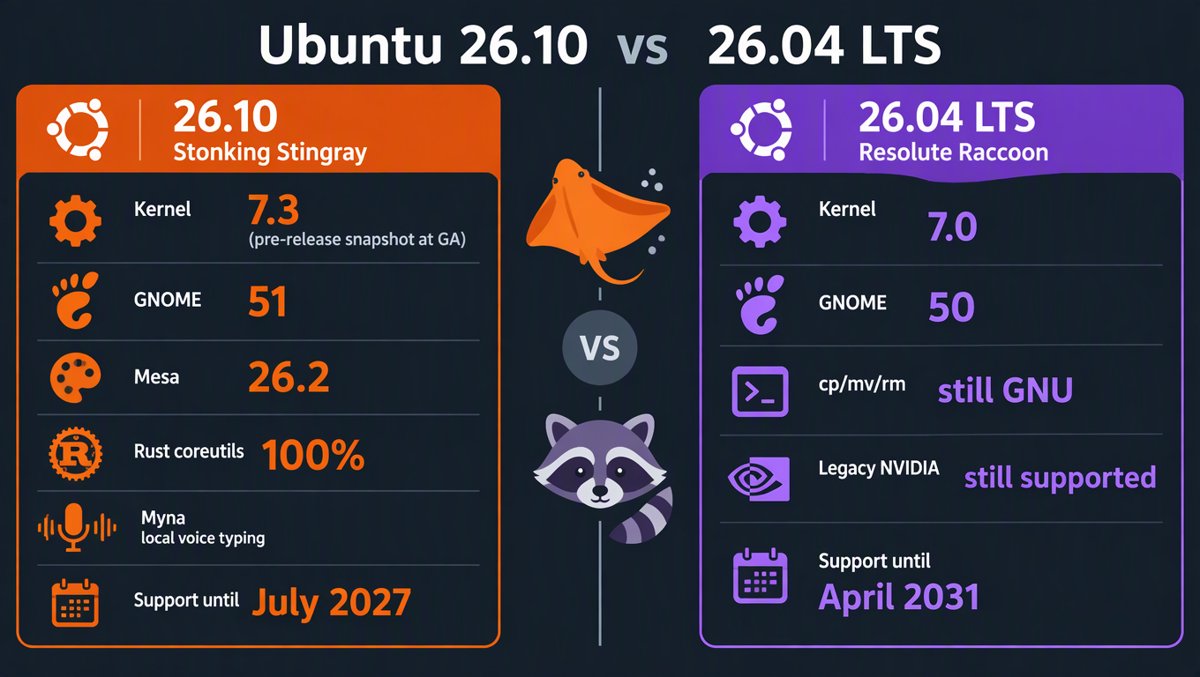
| Kernel | Linux 7.3 (pre-release snapshot at GA, stable via updates) | Linux 7.0 |
| Desktop | GNOME 51 | GNOME 50 |
| Graphics | Mesa 26.2 | — |
cp/mv/rm |
Rust (uutils 0.12.0) — GNU opt-in | GNU versions |
| Legacy NVIDIA drivers | Dropped by Mutter | Still supported |
| Myna voice typing | ✅ Optional | ❌ |
| Support until | July 2027 (9 months) | April 2031 (5 yrs; Pro to 2036+) |
| Upgrade path | 26.10 → 27.04 → 27.10 → 28.04 | 24.04 → 26.04 → 28.04 |
Should You Upgrade? A Flowchart in Paragraph Form
You're on 26.04 LTS with a production server, dev box, or family machine → stay put. Nothing in 26.10 is worth trading a support window that runs to April 2031 for one that ends July 2027. And here's the kicker: 26.04 users get the 7.3 kernel anyway, via the Hardware Enablement stack in the 26.04.2 point release in early 2027. There is no permanent feature gap — only a timing gap.
You're on 25.10 → you have no choice. It hit end-of-life in July 2026. Move to 26.04 LTS if you want support, or 26.10 if you like living dangerously.
You're on 24.04 LTS → skip 26.10. LTS-to-LTS is the supported upgrade path. Wait for 28.04, via 26.04.
You just bought bleeding-edge hardware — a Zen 6 Ryzen, a Nova Lake laptop, Snapdragon X2 — → 26.10 is genuinely the right answer. The 7.3 kernel's day-one enablement is exactly what new silicon needs, and you'd otherwise wait until early 2027 on the LTS.
You run a legacy NVIDIA card → do not upgrade without testing first. Mutter's legacy-driver removal is a hard cliff, not a slope.
You're curious → VM or spare partition. This release is the rehearsal for 28.04 LTS. Watching the Rust coreutils, Myna, and the 7.3 kernel shake out on hardware you don't depend on is precisely how the interim-release system is supposed to work.
The Honest Verdict
Ubuntu 26.10 is not flashy, and that's the point. It's the release where Canonical bet on a kernel that wasn't finished, completed a two-year migration to memory-safe system utilities that survived a 44-CVE security audit, retired a D-Bus daemon older than some of its users, and shipped its first on-device AI feature that phones home to no one. Every one of those bets is aimed at 28.04 LTS.
The stingray is "stonking" precisely because it's half-buried in sand — most of its work happens where you can't see it. Whether to upgrade is easy to answer: production stays on the raccoon; the stingray is for tinkerers and new hardware. But what landed here will be inside every Ubuntu machine you touch for the next five years.
Sources: Ubuntu 26.10 official release notes (documentation.ubuntu.com), Ubuntu Discourse kernel announcements, Phoronix ("Ubuntu 26.10 Switches To The Linux 7.3 Kernel", Sept 18; "Ubuntu 26.10 Moves cp, mv & rm Over To Rust Coreutils", Sept 16), It's FOSS feature tracker, OMG! Ubuntu / OS News on the coreutils completion, 9to5Linux beta coverage (Oct 1), linuxiac roadmap coverage, ComputingForGeeks uutils hands-on, fosslinux.com hands-on testing (Oct 11).