The 5MB Rust 'Docker Killer' Is Neither 5MB Nor a Docker Killer
The 5MB Rust "Docker Killer" Is Neither 5MB Nor a Docker Killer — But You Might Still Want It
A Chinese tech post made the rounds this week with a headline that does everything a headline should do: "Don't install Docker on a small server, this 5MB Rust miracle is wonderful." It promises you a Rust binary so small and so fast that your 1-core, 1GB VPS stops wheezing.
I installed it on Ubuntu, ran it, measured it, and read the docs cover to cover. Here's the honest version.
The verdict first
The project is Super — schiplat/super, MIT licensed, a Rust process orchestrator. It is not a Docker replacement. It is a Supervisor / PM2 replacement, and its own docs say so plainly: "A modern replacement for tools like Supervisor or PM2, built with Rust."
Two claims in that headline are wrong:
- It is not 5MB. The
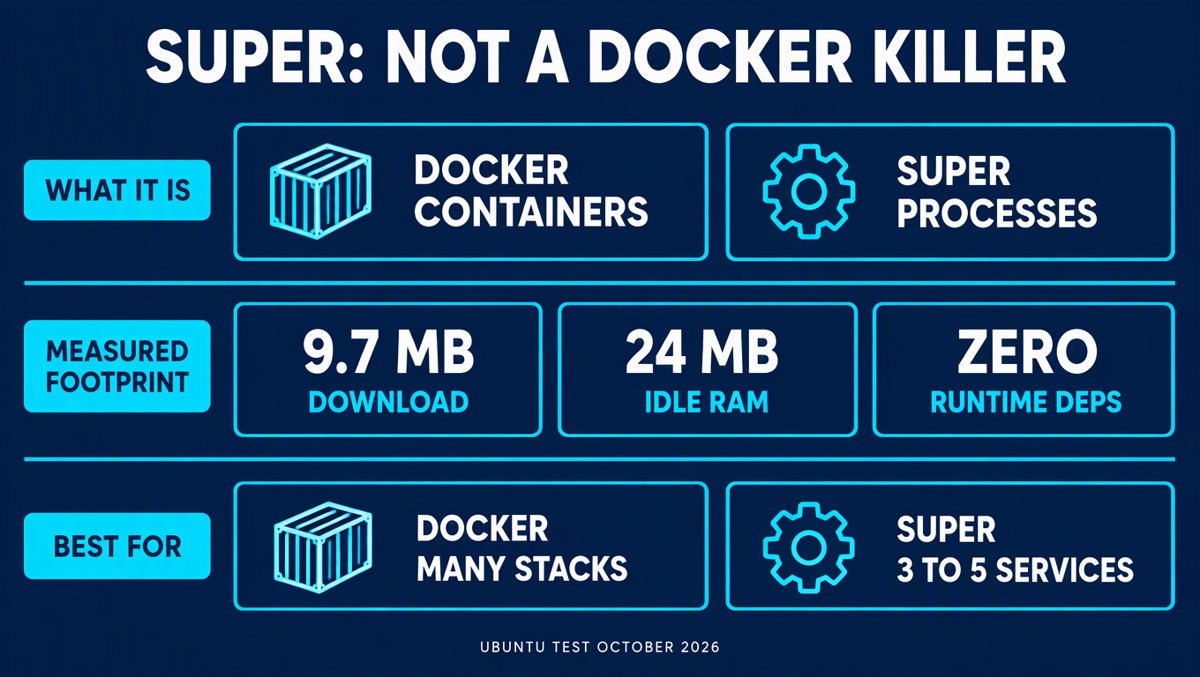
superddaemon binary is 21MB on disk. The whole tarball is 9.7MB compressed. ThesuperCLI is 4MB. Idle RSS on my test box: 24.3 MiB. - It is not a Docker replacement. It has no images, no namespaces, no cgroups in the free version, no filesystem layering. It does one thing: keep a small set of processes alive and started in the right order.
But the instinct behind the post is correct, and this is the part worth your attention: if you have a 1-core VPS running nginx, one app, and one worker, Docker is genuinely overkill — and Super is a much better fit for that job than either Docker Compose or a hand-written systemd unit.
So: wrong headline, right idea.
What Super actually is
Two binaries, zero runtime dependencies:
superd— the daemon. Spawns processes, runs health checks, restarts crashes, rotates logs, serves a REST API, a WebSocket log stream, Prometheus metrics, and an embedded web dashboard.super— the CLI. Which is only an HTTP client forsuperd. It doesn't spawn anything itself.
That second point is the design decision that matters most. Because the CLI is a thin API client, everything you can do in a terminal you can also do from CI, from a script, or from an AI agent — curl it, no XML-RPC wrapper library required. That is the single biggest practical difference from Supervisor, whose API is XML-RPC and effectively un-curlable.
Under the hood, per the design philosophy doc:
| Design choice | Why it exists |
|---|---|
| Tokio actor model, single state owner | One ProcessRegistry in one event loop; all API calls, health checks and exits become commands in a mailbox (capacity 2048). No lock contention. |
| Non-blocking event persistence | Lifecycle events try_send to a background writer that batch-inserts into SQLite. If the queue fills, events are dropped rather than blocking process control. The actor never waits on disk. |
process_group(0) + kill(-PID) |
Stopping a service signals the whole process tree, not one PID. No orphaned Java process holding port 8080. |
| 10-second detached SIGKILL timer | If your graceful shutdown deadlocks, the group gets killed anyway. |
| Exit 0 = "done", exit ≠ 0 = "crashed" | POSIX-correct. Makes one-off and cron jobs work without special-casing. |
| 100ms stagger between spawns | On reboot, 30 services don't all hit the disk at once and cascade into health-check timeouts. |
write .tmp → fsync → rename |
Snapshot state survives power loss. |
| OTA write-ahead log | A binary update interrupted by a power cut auto-rolls back. |
That's a thoughtful design. Somebody has been burned by process managers before.
I ran it. Here's what it actually costs.
I pulled the v1.7.1 Linux x86_64 tarball, unpacked it, made a SUPER_ROOT, and started the daemon. Every number below is measured on the box, not copied from a marketing page.
| Measurement | Result |
|---|---|
| Release | v1.7.1, published 24 Oct 2026 |
| Compressed tarball | 9.7 MB |
superd binary on disk |
21 MB (stripped) |
super CLI binary on disk |
4.0 MB |
| Unpacked directory total | 25 MB |
Idle RSS of superd |
24.3 MiB |
| RSS with 5 managed programs | 24.6 MiB (≈350 KB for five extra) |
GET /api/v1/programs latency |
0.35 – 0.49 ms |
| On-disk state after 5 programs | 8.8 KB snapshot + ~135 KB SQLite WAL |
| Runtime dependencies | none — no Python, no Node, no JVM |
file output |
ELF 64-bit, dynamically linked (glibc), stripped |
A note on the RAM figure, because the docs are a bit loose here. The design-philosophy page claims "a statically compiled Super binary (via musl with LTO and stripped symbols) typically consumes <5MB of RAM." I measured 24.3 MiB idle, and file says the shipped build is glibc-dynamic, not a musl static. The comparison page elsewhere says "~15MB (superd + super, release build)" — measured 25MB. To the project's credit, the vs-PM2 page actually tells readers not to quote any fixed RSS figure: "Do not treat any megabyte range on this page as a measurement." Good discipline. The 5MB in the headline is closest to true for the CLI binary size, not RAM and not the daemon.
Still: 24 MiB and 0.4 ms is very comfortable on a 1GB box. The claim that survives is "tiny footprint." The claim that doesn't is "5MB."
Super vs Docker: not the same layer
This is where the viral post does real damage. Super does not containerize anything. Your processes share the host's kernel, filesystem, network stack and — in the free version — have no memory or CPU ceiling.
| Docker / Compose | Super (OSS) | |
|---|---|---|
| Unit of work | An image → container | A command → process group |
| Isolation | namespaces + cgroups | none (process group only) |
| Resource limits | built in | licence-gated (cgroup plugin) |
| Portability of the artifact | image is the artifact, runs anywhere | you must install the binaries on the target |
| Disk cost | daemon + images (hundreds of MB typical) | 25 MB, no image cache |
| Memory cost | dockerd idle, plus per-container overhead | ~24 MiB total for the daemon |
| Multi-tenant safe | yes | no — single admin token, no RBAC, no audit |
| Best at | many services, mixed versions, reproducible builds | 3–5 services on one small box |
Where Docker wins decisively and Super can't follow: you cannot run two apps that need conflicting glibc / Python / Node versions side by side. Super runs whatever binary you point at it on the host. That's the whole trade. You get a 25MB control plane instead of a 500MB one, and you give up environmental isolation.
Where Super wins: Docker on a 1GB VPS is genuinely painful. dockerd alone is a couple hundred MB of RSS on a bad day, the image cache fills a 20GB disk, and pulling a base image over a slow link is a coffee break. For nginx + one app + one worker, you're paying all of that to solve a problem you don't have.
Super vs systemd: different jobs, and they compose
The docs are refreshingly honest about this rather than pretending to be an init system:
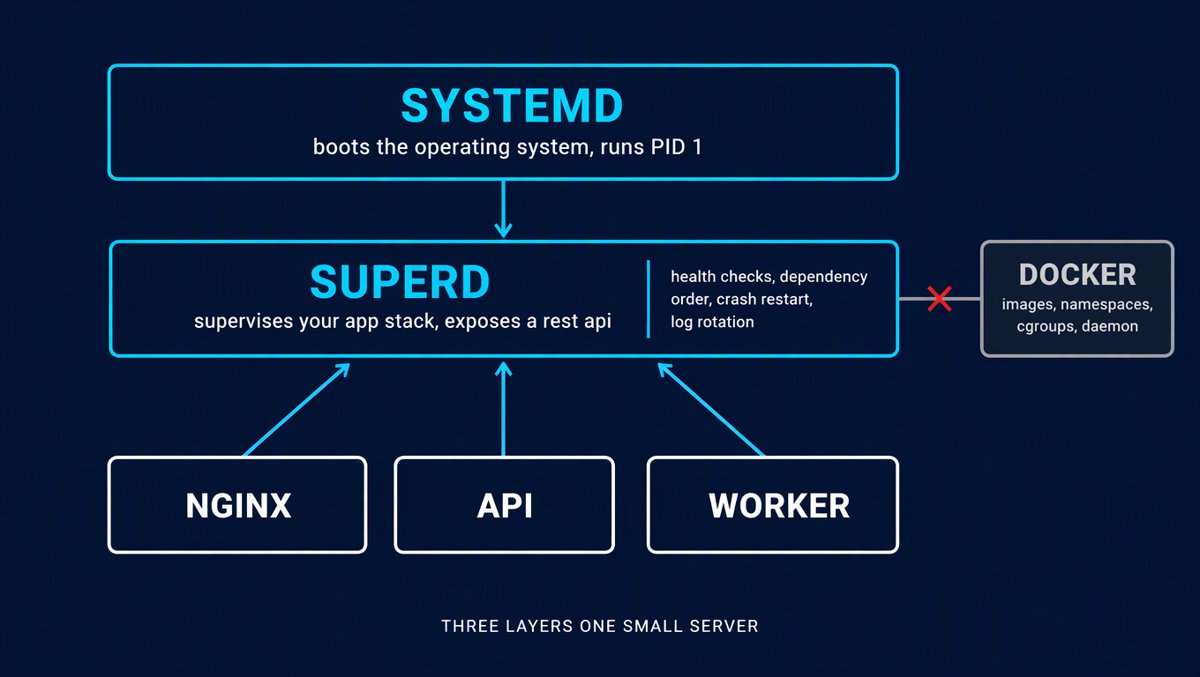
"Use Systemd to boot the OS and start the Super daemon. Use Super to manage your application stack."
| systemd | Super | |
|---|---|---|
| Scope | OS init, PID 1, everything | your app stack only |
| Inside a container | heavy or impossible | native |
| Config format | unit files, distro-flavoured | one TOML, same on Ubuntu/Alpine/macOS |
| Adding a service dynamically | new unit file + daemon-reload | super add --name x --autostart /path/to/x |
| HTTP health checks | no (systemd-notify only) | yes, TCP and HTTP gates |
| Dependency ordering | After=/Requires= |
depends_on + health gate |
| Remote API | D-Bus, awkward over network | REST + WebSocket |
| Zero-downtime reload | yes, via socket activation | no |
| Zombie reaping | yes, it's PID 1 | no — by design |
That last row is the sharpest edge in the whole project, and it's worth reading the docs on it directly: "Super is not a global zombie reaper. A global SIGCHLD handler would compete with Tokio's child.wait() on managed processes and can cause deadlocks." Fair argument — but it means Super is not a drop-in for PID 1. In Docker you still need tini. On bare metal you still need systemd underneath.
Features, and where the paywall is
The OSS build is genuinely useful. The free/paid split, though, is aggressive in a specific direction: everything a shared or regulated environment needs is paid.
| Capability | Free (MIT) | Licensed |
|---|---|---|
start/stop/restart, autorestart, numprocs |
✅ | ✅ |
Dependency orchestration (depends_on + health gate) |
✅ | ✅ |
| TCP/HTTP health checks | ✅ | ✅ |
| Log rotation + WebSocket log streaming | ✅ | ✅ |
Historical logs API, system stats, Prometheus /metrics |
✅ | ✅ |
| Cron scheduler | ✅ | ✅ |
| Embedded web dashboard | ✅ | ✅+ |
Event hooks (command or webhook url) |
✅ | ✅ |
| Atomic OTA binary updates with auto-rollback | ✅ | ✅ |
| Linux cgroup CPU/memory limits | ❌ | ✅ |
| RBAC / user roles | ❌ | ✅ |
| Audit log | ❌ | ✅ |
| Alerting (Slack/钉钉/Teams, storm suppression) | ❌ | ✅ |
| Multi-user API tokens | ❌ | ✅ |
| Dashboard Pro (token UI, hot reload) | ❌ | ✅ |
A 90-day free trial is offered, and there's a ¥10/month "OSS sponsorship" tier. Note the trap: licensed startup hard-requires the security plugin and an auth_secret, so you can't casually enable one paid feature — it's a bundle.
Strengths, honestly
- The CLI-is-an-API design. Everything is programmable. This is the thing that makes it interesting for automation and agent work, and Supervisor can't match it.
- Restart semantics that respect POSIX. Exit 0 means finished, not crashed. One-off migrations and cron jobs behave correctly out of the box, which is more than most supervisors manage.
- Real operational guard rails. Flapping detection, staggered startup, log-line truncation at 16KB (a runaway
log()loop can't OOM your supervisor), bounded cron overlap withskip/queue/killandkill_after_secs. - Transactional OTA with rollback. Freeing your deploy from "hope the new binary starts" is genuinely production-grade thinking.
- TOML stack files with
depends_onand health gates.super apply stack.tomlconverging nginx → app → worker in dependency order, reverse on stop, is exactly what you want and what Compose gives you only with more moving parts. - Ships an AI-oriented
docs/SKILL.md. Point Cursor/Claude at it so the model writes correct TOML instead of guessing. Small touch, correct instinct.
Weaknesses, also honestly
- It's new and barely used. Created 10 July 2026. 220 commits. 39 stars, 3 forks, 1 open issue. The v1.7.1 arm64 build has 9 downloads. This is not battle-tested software — it's a promising 3-month-old project that describes itself as having moved from beta to "1.x production-ready."
- No cgroups without paying. On a 1GB box, a leaking worker with no memory cap is exactly the failure mode you bought a process manager to prevent. That's the biggest gap between what the viral post implies and what the free tier delivers.
- Single admin bearer token. No RBAC, no per-operator audit in OSS. Don't expose the API beyond loopback, and the docs say so bluntly.
- No zero-downtime deploys. Like Supervisor, it will not run old and new versions of the same program simultaneously. You need a load balancer or blue-green for that.
- No zombie reaping, no PID 1 duty. Contract, not a bug — but it constrains how you deploy it.
[[programs]]insuper.tomlare silently a mistake. Programs live inconf.dstack files, the API, ordata/snapshot.json.super checkflags the table as an error. Easy to get wrong from the README alone.- Docs/repo naming inconsistency. The repo org is
schiplat, the docs site is onsuper.docs.sconts.com. Looks like a re-brand mid-flight. Worth noting if you care about long-term support. - No
--uninstallin the installer. Manual cleanup only. - Docs oversell the footprint. "5MB RAM," "~15MB," actual 25MB on disk / 24MiB RSS.
Installing on Ubuntu, step by step
I did this on Ubuntu 24.04. Here's the real path, with the gotchas that will actually bite you.
1. Install
curl -fsSL https://github.com/schiplat/super/releases/latest/download/install.sh | sh
The script downloads the matching archive, verifies SHA256SUMS, installs superd + super into /usr/local/bin (or ~/.local/bin if not writable), creates an instance root at /opt/super (system) or ~/.super (user), and — this is the nice part — generates and enables the systemd unit for you.
Requirements: POSIX sh, tar, curl. No Rust, no Python, no Node.
Pin a version if you don't want surprises:
curl -fsSL https://github.com/schiplat/super/releases/latest/download/install.sh | sh -s -- --version 1.7.1
Useful flags: --user / --system (per-user vs system-wide), --no-service (binaries only), --no-start, --prefix DIR, --root DIR, --no-sudo.
Then open a new shell (or source /opt/super/env.sh) so SUPER_ROOT is on your environment, and verify:
super doctor
super doctor is the best idea in this project. One command checks config syntax, the socket, log dir writability, the data file, include globs, daemon connectivity, and license mode — and tells you why it fails.
2. Configuration — $SUPER_ROOT/conf/super.toml
Reset to the sane defaults and change only what you need:
[server]
host = "127.0.0.1"
port = 9002
# auth_secret = "<long random string>"   # REQUIRED if you bind beyond loopback
shutdown_timeout = 10
flapping_window = 60
flapping_threshold = 5
socket = "run/superd.sock"       # local CLI prefers this
daemon = false                    # keep false under systemd
enable_docs = false               # Swagger off by default; leave it off

[logging]
log_level = "info"
log_max_mb = 50
log_backups = 3

[child_logging]
max_size_mb = 10
max_backups = 5
max_line_size_kb = 64

[storage]
data_file = "data/snapshot.json"
events_file = "data/events.db"
events_keep_days = 30
log_dir = "logs"

[include]
files = ["conf/conf.d/*.toml"]
Hard rule: non-loopback binds require a non-empty auth_secret or superd refuses to start. That's fail-closed by design, and it's the right call.
3. Define your stack — conf/conf.d/app.toml
prune = false

[[services]]
name = "web"
command = "/srv/app/.venv/bin/gunicorn"
args = ["myproject.wsgi:application", "--bind", "127.0.0.1:8000", "--workers", "1"]
cwd = "/srv/app"
autostart = true
autorestart = "unexpected"
exitcodes = [0]
startsecs = 5
retry_limit = 3
env = { DJANGO_SETTINGS_MODULE = "myproject.settings" }
health_check = { type = "http", url = "http://127.0.0.1:8000/health/" }

[[services]]
name = "nginx"
command = "/usr/sbin/nginx"
args = ["-c", "/srv/app/nginx/nginx.conf", "-g", "daemon off;"]
depends_on = ["web"]
autostart = true

[[services]]
name = "worker"
command = "/srv/app/scripts/run-worker.sh"
autostart = true
numprocs = 2          # worker-0, worker-1; SUPER_PROCESS_NUM injected
Then:
super apply conf/conf.d/app.toml
super list
super logs @app --tail
prune = false matters. Set it to true and Super will remove every managed program not in that file. Leave it false unless the file is your complete inventory.
4. Cron without crontab
super add --name nightly-backup --cron "0 0 2 * * *" --on-overlap queue \
  --jitter 60 /srv/scripts/backup.sh
Note the six fields — seconds first. 0 0 2 * * * is 2:00 AM. Cron jobs are exempt from flapping detection, never autostart, and exit 0 means "job done, wait for next tick." You get centralised logs, exit codes, durations and queue_full events — which is precisely what crontab never gave you.
5. Gotchas that will bite you
- Programs must run in the foreground. nginx needs
-g "daemon off;". Anything that forks and exits its parent is a contract violation, and Super will think the service stopped while the work continues untracked. - Don't escape the process group. No
setsid(), no double-fork. Those become orphans Super can't signal on stop. - This is not PID 1. In Docker, still use
tini. On a VM, let systemd be PID 1 and Super be a service. [[programs]]insuper.tomlis ignored.super checkwill flag it. Useconf.d.- Log lines are truncated at 16KB by default (
max_line_size_kb). It's a daemon-protection feature. If you need longer lines, raise it — but know why it's there. - Re-running
install.shis the upgrade path. It replaces binaries and the unit, keeps yoursuper.toml, rewritesenv.sh, and restarts the service. That's a sensible upgrade design. - There's no
--uninstall. Cleanup is manual:sudo systemctl disable --now superd, delete the unit and/etc/profile.d/super.sh,daemon-reload.
Why this matters for nxagents
This is the part I actually got excited about, and it's the part the viral post doesn't mention at all.
Super's control plane is a plain REST API and its CLI is just a client of it. That means an agent can operate a process manager as a tool — no wrapper library, no XML-RPC, no shelling out and parsing table output.
A practical integration ladder, cheapest first:
- Try it as a side-car on one small box. Install with
--user, point it at three things you already run (a static site, an app, a worker). Zero cost, one afternoon. Measure your own RSS before quoting anyone's number — including mine. - Use
super doctoras your health check in agent workflows. It's a single deterministic command that reports config validity, daemon reachability and license mode. Cheap, structured, no parsing. - Wrap the CLI as a skill, not the REST API.
super list --json-ish output plussuper add/super restart/super logs --tailgives an agent safe, bounded verbs. Keep the API bound to loopback and let the CLI hold the token. - Hand the repo's
docs/SKILL.mdto your coding agent. It's written for exactly this: correctsuper.tomlschema, cron and health semantics, known failure modes. It prevents the model from writing Supervisor-flavoured config thatsuper checkrejects. - Use
[[event_hooks]]with aurlfor agent-visible events. OSS emits raw event JSON on lifecycle changes, crashes, cron runs and OTA outcomes. That's a free webhook feed into an agent inbox — no licensednotifyplugin required. - Use the OTA
artifactblock instead of redeploy scripts.download_timeout+verify_timeoutwith automatic rollback turns "did the new binary come up?" into a recorded event rather than a hopeful log. - Do not use it for multi-tenant work in OSS. One admin bearer, no RBAC, no audit, no cgroup caps. If you need per-process isolation or per-user audit, that's the licensed tier — or stay on containers.
The bottom line
The post's headline is wrong on the two facts people will repeat. It's not 5MB and it's not a Docker killer.
What's actually true is more useful: for the very common "three services on a one-core VPS" shape, a 25MB Rust daemon with an HTTP API, health gates, cron, log rotation and transactional binary updates is a better tool than Docker Compose — and much better than the hand-rolled systemd unit plus crontab plus logrotate plus a bash deploy script that most people end up with.
Caveats worth taking seriously: 39 stars, three months old, nine downloads of the arm64 build, and the one feature that keeps a leaking worker from killing your box is behind a licence. So treat it as a strong candidate to pilot, not a proven drop-in.
Install it next to your existing setup, give it three real services, and run it for two weeks. That's cheap. Believing the headline is what costs you.