Pi on Ubuntu, Start to Finish: Installing the 1,000-Token Harness Next to Your OpenCode
Pi on Ubuntu, Start to Finish: Installing the 1,000-Token Harness Next to Your OpenCode
A friend told me pi is fast. Not "fast like a good model" fast — fast like "I opened a terminal and the answer was already there" fast. He's been daily-driving it for months, dumped Codex for it, and runs DeepSeek through it. I've been too busy to test it, so I did what I usually do when somebody hands me a hype screenshot: I installed it on Ubuntu and read the actual config files.
This is the installation and configuration guide I wish had existed — every command verified against pi's own installer script, docs, and release notes as of v1.4.0 (21 October 2026). And because I'm currently running opencode v1.18 and not planning to replace it, this is written as a side-by-side: what pi is, how to stand it up cleanly on Ubuntu, and where it actually differs from the tool already in your PATH.
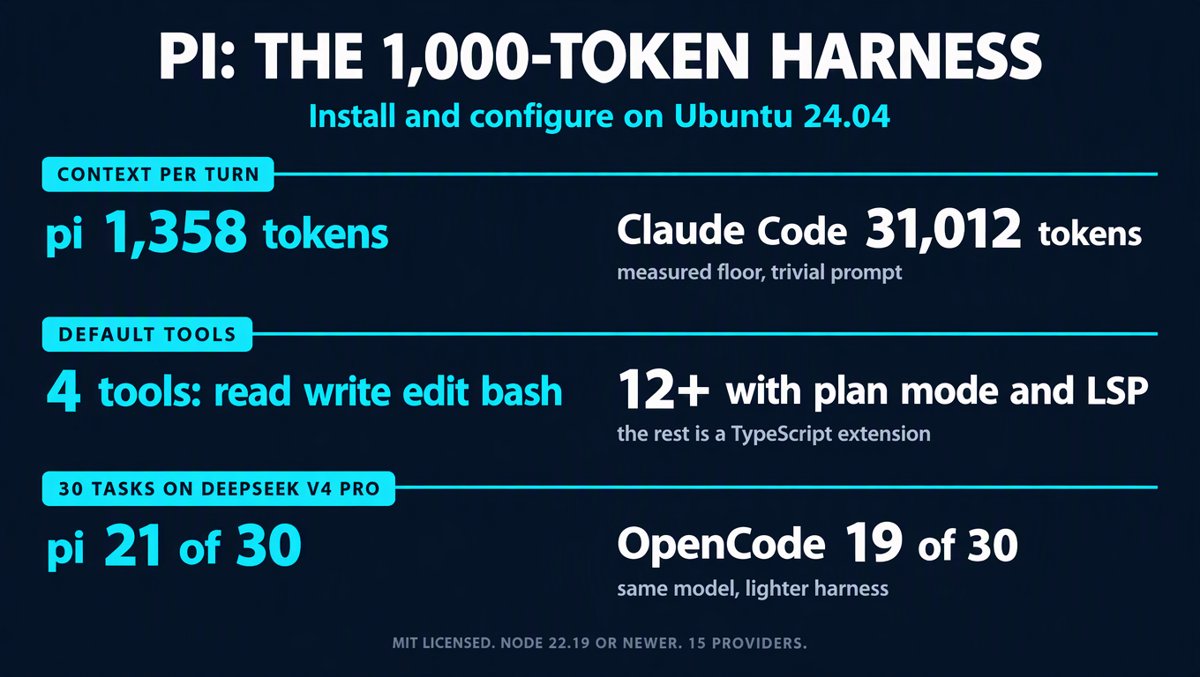
Short version up front: pi isn't faster than everything else. It's lighter. It sends roughly one to one-and-a-half thousand tokens of fixed overhead per request instead of seven to thirty thousand. When 80% of your latency and 80% of your bill is harness chrome you didn't ask for, deleting that chrome feels exactly like a speed upgrade. That's the whole trick, and it's a real one.
What pi actually is (and what it deliberately isn't)
Pi is a minimal, MIT-licensed agent harness — not a product with a feature list. It ships four tools (read, write, edit, bash), a system prompt small enough to read in one screen, and a TypeScript extension API for everything else. Created by Mario Zechner (the libGDX author), now maintained by Earendil — the public-benefit corporation Armin Ronacher co-founded. The repo moved from badlogic/pi-mono to earendil-works/pi in May 2026; the CLI is still just pi.
Pi 1.0 shipped on 1 October 2026. The release notes are refreshingly boring: codemode (native MCP plus non-LLM models), virtual-model extensions, deferred tool loading, Anthropic cache warming, mid-conversation system messages, a new theme, and fullscreen-by-default. Since then v1.3.0 (15 Oct) and v1.4.0 (21 Oct) have landed fixes — including a genuinely nasty one for Linux users who copy text (more on that below).
What pi does not ship is equally intentional, and this is the part that trips people up:
- No sub-agents. Spawn pi instances in tmux, or build/install one.
- No plan mode. Write plans to files, or install a package.
- No built-in to-dos, no background bash. Use
TODO.mdand tmux. - No permission popups. By default it runs with the permissions of the user who launched it.
- No built-in sandbox. Containerize it yourself — three documented patterns below.
Every one of those is a "feature you can add in twenty lines of TypeScript." On one hand that's honest minimalism. On the other, it means pi in a fresh terminal is a chassis, not a car. Plan your first hour accordingly.
Step 1 — Node 22.19+ (the part that bites Ubuntu users)
Pi requires Node.js 22.19.0 or newer. On Ubuntu 24.04 LTS, apt install nodejs gives you Node 18 — too old, and the installer will tell you so:
error: Pi requires Node.js 22.19.0 or newer. Found v18.19.1.
Three ways out. Pick one.
A. The one-line installer (recommended). It runs a preflight check, sees your Node is too old, offers to install a standalone Node into ~/.local/share/pi-node/current, then installs pi as a managed install:
curl -fsSL https://pi.dev/install.sh | sh
The standalone path needs xz-utils; the installer will apt-get install -y xz-utils for you if it's missing (you'll get a sudo prompt). It verifies the Node download against SHASUMS256.txt. When it finishes it may print:
export PATH="$HOME/.local/share/pi-node/current/bin:$PATH"
Add that to your ~/.bashrc if pi or node isn't found in a fresh shell. The managed install also gives you pi update later, and installs from pi's generated install-lock — which pins transitive dependencies. That's the difference between an installer and npm.
B. nvm, if you don't want another package manager touching your system:
curl -o- https://raw.githubusercontent.com/nvm-sh/nvm/v0.40.3/install.sh | bash
source ~/.bashrc
nvm install 22
curl -fsSL https://pi.dev/install.sh | sh
C. Plain npm. Works, but understand the trade-off: the npm package explicitly does not pin transitive dependencies (the installer does). Pi is unusually careful about this — save-exact=true, min-release-age=2, pre-commit blocks accidental lockfile commits — and npm bypasses all of it.
npm install -g --ignore-scripts @earendil-works/pi-coding-agent
Verify:
pi --version # expect 1.4.x or newer
One note on disk usage, because "minimal" misleads people here. The npm install lands roughly 449 MB in node_modules — most of it @esbuild platform binaries plus the Anthropic, OpenAI, Google and AWS SDKs so that every provider works out of the box. Pi is minimal in context tokens, not on disk. And on first interactive launch it silently downloads fd and ripgrep (~6.7 MB) into ~/.pi/agent/bin.
Step 2 — Authenticate a provider
Two paths, both writing to ~/.pi/agent/auth.json:
pi
/login          # pick a provider, follow OAuth or paste an API key
Or skip /login entirely and use the environment, which is what you want on a server or in CI:
export DEEPSEEK_API_KEY="sk-..."
export ANTHROPIC_API_KEY="sk-ant-..."
export XAI_API_KEY="..."
export OPENROUTER_API_KEY="sk-or-..."
export ZAI_API_KEY="..."            # Z.AI coding plan
export OPENCODE_API_KEY="..."       # OpenCode Zen / Go
Precedence, in order: a runtime --api-key, then auth.json, then apiKey in models.json, then the provider's environment variable.
Position pi against opencode v1.18 here. If you already pay for an opencode subscription, OPENCODE_API_KEY makes pi a first-class provider instantly — same subscription, different harness. That is the least disruptive way to evaluate pi without touching your opencode install. Both read the same key; neither replaces the other, and they don't conflict because they use totally different config directories (~/.config/opencode vs ~/.pi/agent).
Step 3 — Wire up DeepSeek (the combination in the hype post)
DeepSeek publishes an official pi integration block. Two things I want to flag before you paste it: the doc page still shows the pre-move package name @mariozechner/pi-coding-agent (doc lag — the install command above is the current one), and the compat block is not optional — without it, DeepSeek reasoning turns get dropped from assistant messages and the model loses its own chain of thought between turns.
Create ~/.pi/agent/models.json:
{
  "$schema": "https://pi.dev/schemas/models.schema.json",
  "providers": {
    "deepseek": {
      "baseUrl": "https://api.deepseek.com",
      "api": "openai-completions",
      "apiKey": "$DEEPSEEK_API_KEY",
      "models": [
        {
          "id": "deepseek-v4-pro",
          "name": "DeepSeek V4 Pro",
          "contextWindow": 1000000,
          "maxTokens": 384000,
          "input": ["text"],
          "reasoning": true,
          "cost": { "input": 1.74, "output": 3.48, "cacheRead": 0.145, "cacheWrite": 0 },
          "compat": {
            "requiresReasoningContentOnAssistantMessages": true,
            "thinkingFormat": "deepseek",
            "reasoningEffortMap": {
              "minimal": "high", "low": "high", "medium": "high",
              "high": "high", "xhigh": "max"
            }
          }
        },
        {
          "id": "deepseek-v4-flash",
          "name": "DeepSeek V4 Flash",
          "contextWindow": 1000000,
          "maxTokens": 384000,
          "input": ["text"],
          "reasoning": true,
          "cost": { "input": 0.14, "output": 0.28, "cacheRead": 0.028, "cacheWrite": 0 },
          "compat": {
            "requiresReasoningContentOnAssistantMessages": true,
            "thinkingFormat": "deepseek",
            "reasoningEffortMap": {
              "minimal": "high", "low": "high", "medium": "high",
              "high": "high", "xhigh": "max"
            }
          }
        }
      ]
    }
  }
}
The $DEEPSEEK_API_KEY syntax is pi's environment interpolation — $NAME, ${NAME}, a literal key, or a leading !command to pull from a secret manager all work. ($$ escapes a literal $.) Then:
export DEEPSEEK_API_KEY="sk-..."    # put this in ~/.bashrc
cd ~/projects/whatever
pi
/model                              # pick deepseek → DeepSeek V4 Pro
pi --list-models deepseek           # or confirm from outside the TUI
Cost reality check from the block above: V4 Pro is $1.74 in / $3.48 out per million tokens with a $0.145 cache-read. V4 Flash is $0.14 / $0.28. Both claim a 1M context and 384k max output. That ratio — Pro at ~12x the price of Flash — is why the practical setup below routes by task instead of defaulting to "the good one."
One models.json gotcha worth knowing: apiKey values are Pi config, so a literal key written there is exactly as readable on disk as one in auth.json. Prefer $ENV_VAR. And if you switch an existing provider from /login credentials to a models.json block, run /logout <provider> first — a stored credential wins over the file and will silently hide your custom models.
Step 4 — Know the config directory, because this is where pi differs most
Everything lives in ~/.pi/agent/ (override with PI_CODING_AGENT_DIR), with a per-project .pi/ that loads after you grant project trust:
| File / dir | What it does |
|---|---|
settings.json |
Defaults, thinking level, tools, compaction, retries, proxy |
models.json |
Custom providers, model overrides, compat flags |
auth.json |
API keys and OAuth credentials — keep it private, never commit |
mcp.json |
MCP servers available in every project |
AGENTS.md |
Instructions loaded at startup, applied across working directories |
SYSTEM.md / APPEND_SYSTEM.md |
Replace or append to the system prompt |
extensions/ |
Your TypeScript extensions |
skills/, prompts/, themes/, keybindings.json |
Exactly what they sound like |
Project .pi/ mirrors the interesting half of that: settings.json, mcp.json, SYSTEM.md, extensions/, skills/, prompts/. A trusted project file wins over the agent-directory file of the same name — they are not merged.
AGENTS.md is the one to set up on day one, both globally and per repo. Same convention your other agents already use:
# Project Instructions
- Run `npm run check` after any code change.
- Never run production migrations locally.
- Use the existing error handling pattern in src/errors/.
- Explain risky edits before executing them.
Step 5 — A sane ~/.pi/agent/settings.json for Ubuntu
You can drive most of this from /settings inside pi, but here's a starting file I'd actually ship. Every key below is a real, documented setting:
{
  "$schema": "https://pi.dev/schemas/settings.schema.json",
  "defaultProvider": "deepseek",
  "defaultModel": "deepseek-v4-pro",
  "defaultThinkingLevel": "high",
  "modelThinkingLevels": {
    "deepseek/deepseek-v4-flash": "minimal"
  },
  "enabledModels": ["deepseek/*", "opencode/*"],
  "defaultTools": ["read", "write", "edit", "bash", "grep", "find", "ls"],
  "tuiMode": "regular",
  "hideThinkingBlock": false,
  "showCacheMissNotices": true,
  "compaction": { "enabled": true, "reserveTokens": 16384, "keepRecentTokens": 20000 },
  "retry": { "enabled": true, "maxRetries": 3, "baseDelayMs": 2000 },
  "defaultProjectTrust": "ask"
}
Why those choices, in order of how much pain they save:
tuiMode: "regular"— 1.0 madefullscreenthe default and the Hacker News thread was loud about it. On a native terminal fullscreen is fine. Inside tmux, screen, or a framebuffer it isn't: your scrollback moves from the emulator into the app, and 1.0 shipped with two real bugs there — history-jumps landing on the wrong turn, and ANSI blink artifacts underscreen. If your workflow is SSH → tmux → agent, setregularand keep your terminal's scrollback. Flip it back once you trust the TUI.defaultToolswithgrep,find,lsadded — pi defaults to four tools and expects you to shell out. You can — butgrep/findas real tools are cheaper and more reliable than a bash string the model has to get right. Note the syntax: plain names replace the default list, while+name/-namemodify it.["+codemode"]is how you enable codemode without retyping everything.modelThinkingLevelsper model — pin V4 Flash tominimalso your fast/cheap model stays fast, and let Pro sit athigh. Otherwise you'll wonder why "the fast one" feels slow.compaction— 16,384 tokens of reserve and 20,000 recent tokens kept is the documented default and a good ratio at 1M context. Don't tune it before you've hit a wall.defaultProjectTrust: "ask"— project.pi/config can execute code (settings and extensions run inside the pi process). Keep the prompt.httpProxy— if you're behind a corporate proxy, this is where it goes, and note it can only be set in the agent-directorysettings.json, not a project file.
Step 6 — Measure your own context floor before you believe anyone
This is the single most useful habit I picked up from the pi crowd, and it costs one command. In an empty directory:
mkdir -p /tmp/pi-bench && cd /tmp/pi-bench
pi --mode json -p "reply with exactly the word PONG" | jq '.usage.input_tokens'
A reported floor is 1,358 input tokens with skills, extensions and context files disabled. Do that again with your normal config loaded. One reviewer ran the same prompt and found pi had silently auto-discovered 48 skills from ~/.agents/skills and ~/.agents/skills — the same directories other harnesses use — injecting 9,400 tokens of skill descriptions into every single request. His "under 1,000 token" harness was really a 10,787-token one.
Run pi --verbose once and read the startup header. If your context floor is above ~3k, something is loading that you didn't ask for. That's true of every harness, but pi is the first one where you can see it in one number.
What the numbers actually say (including the ones that don't flatter pi)
I'd rather hand you a spreadsheet than a vibe, so here are the comparable figures, all from the last two months:
Composio ran 30 hard agent tool-use tasks on DeepSeek V4 Pro through four harnesses (Aug 2026):
| Harness | Tasks passed | Cost / shared success | Median time |
|---|---|---|---|
| pi | 21/30 | $0.031 | 362.9s |
| DeepSeek Harness | 20/30 | $0.028 | 252.1s |
| OpenCode | 19/30 | $0.032 | 281s |
| Claude Code | 16/30 | $0.074 | — |
Pi won on pass rate. It did not win on speed — DeepSeek's own harness finished ~30% faster at the same task. That's the honest version of "pi is absurdly fast": pi is lighter, not quicker. Same model, ~1.4k tokens of harness overhead instead of ~7k (OpenCode) or ~31k (Claude Code). Less to upload, less to cache, less to pay for. The model's own decode speed is what you feel, and pi gets out of its way.
Three identical coding tasks, pi on Gemini 3.1 Pro vs Claude Code on Fable 5.1 (Sept 2026):
| Task | pi input tokens | Claude Code input tokens |
|---|---|---|
| Add 3 unit tests | 75k | 132k |
| Find + fix a planted bug | 86k | 219k |
| Resolve 4 TODOs with tests | 316k | 245k |
Claude Code consumed 1.8–2.5x the input tokens on every task, and the cost gap was bigger still ($0.10/$0.11/$0.31 vs $0.61/$0.77/$1.16 — different models, so treat the pass rates as the trustworthy column). Both hit 5/5 on a five-rule AGENTS.md. On two of three tasks the diffs were functionally identical, which is the useful finding: four tools were not the bottleneck. Where output quality differed, it was the model, not the harness.
Pi vs opencode v1.18 — the honest split
You're not replacing opencode, so here's the comparison that matters: which lane each one owns.
opencode is a configurable product. Twelve-plus tools out of the box, built-in plan mode, LSP with go-to-definition and find-references, a real permission system with allow/deny/ask glob patterns per tool and per command, .env denied by default, sub-agents, a client/server architecture with opencode serve, a desktop app, GitHub/GitLab @opencode integration, org-wide defaults via a .well-known endpoint. You install it and start working.
pi is a programmable platform. Four tools, ~1.4k-token prefix, 25+ typed in-process TypeScript events (including seven-plus hook points opencode simply doesn't expose: input, before_agent_start, token-level tool execution streaming, direct context-window manipulation, session branching, model_select), and a TUI you can fully repaint. You build the agent you want.
| pi | opencode | |
|---|---|---|
| Default tools | 4 | 12+ |
| Extension model | In-process TypeScript, 25+ events | Out-of-process plugins, ~20 hooks |
| Plan mode | Via extension/package | Built in |
| LSP | Not built in | Built in |
| Permission system | None (YOLO) — build it or containerize | Granular allow/deny/ask |
| Sub-agents | Via extension/package | Built in |
| Sessions | Tree/branchable JSONL, /fork, /tree |
Linear, SQLite |
| Client/server | Terminal + RPC + SDK | TUI + desktop + HTTP API |
| Customization ceiling | Effectively unlimited (you can replace the TUI, the loop) | Bounded but complete |
Two operational notes for someone on 1.18 specifically:
- Stay on 1.18. opencode 2.0 (13 Oct) rebuilt the server API and changed the plugin API — V1 plugins don't run in 2.0, and project-local TUI config doesn't auto-migrate. 1.18 is a stable baseline, and there's no reason to fork your attention two ways while you're evaluating pi.
- They coexist cleanly. Separate config dirs, separate binaries (
pi/opencode), separate keys if you want.OPENCODE_API_KEYlets pi borrow your opencode subscription for the trial, which means your first pi session costs nothing extra. If after two weeks pi is your default for one narrow thing — say, cheap bulk refactors or a scripted pipeline — you've learned something. If it isn't, you've spent api updateand an evening.
Where opencode still wins outright and pi will not catch up by design: LSP-driven navigation, permission enforcement, plan mode, and a real client/server split. If your day is "open repo, ask, review, approve," opencode is the shorter path. Pi's argument is that those behaviors belong in a package you choose, not in a core you can't see.
Step 7 — Five extensions that make vanilla pi usable
Pi's own position is "install a package or build it." Unless you're deliberately studying the tiny-prefix behavior, install these on day one:
pi install npm:pi-hermes-memory     # persistent memory across sessions
pi install npm:pi-mcp-adapter       # connect to any MCP server (GitHub, Playwright, Postgres)
pi install npm:pi-subagents         # parallel isolated sub-agents
pi install npm:pi-tinyfish          # free web search + page fetching (needs free API key)
pi install npm:@juanibiapina/pi-powerbar   # status line: model, tokens, context
Two more worth knowing: pi-vision-proxy routes images to a vision model for text-only models like DeepSeek V4 (you'll want this — V4 Pro is input: ["text"]), and pi-plan gives you read-only planning with approval-based execution. Or skip the picking entirely:
npx @robzolkos/lazypi # 60+ skills, 76 themes, MCP, sub-agents, memory in one command
If you'd rather understand the extension system before installing other people's, write forty lines yourself. Extensions are TypeScript loaded via jiti — no build step, drop the file in ~/.pi/agent/extensions/, /reload, done. They can register tools, intercept and block any tool call, rewrite the system prompt per turn, replace compaction, and repaint the TUI header, footer, status line, widgets and overlays. pi -e npm:some-package loads one ephemerally without installing it, which is the fastest way to audit what you're about to trust.
Step 8 — Sandboxing, because pi ships none
Pi's documentation is blunt: "Pi does not include a built-in permission system for restricting filesystem, process, network, or credential access. By default, it runs with the permissions of the user and process that launched it." No prompt, no popup, no allowlist. On a laptop in a scratch repo that's liberating. On the box that holds your SSH keys it's a liability.
Three documented patterns, cheapest to strictest:
Gondolin extension — keep pi and your provider auth on the host, route the built-in tools and ! commands into a local Linux micro-VM. Best balance: your credentials never enter the sandbox, and the model still gets a real filesystem to work in.
Plain Docker — mount one project, run the whole process inside:
docker run --rm -it \
  -v "$PWD:/work" -w /work \
  -v "$HOME/.pi/agent:/root/.pi/agent" \
  -e DEEPSEEK_API_KEY \
  --network host \
  node:22-bookworm bash -lc "npm i -g --ignore-scripts @earendil-works/pi-coding-agent && pi"
Mount only the project. Do not mount ~ to be convenient — that's the whole point of the exercise.
OpenShell — policy-controlled sandbox, for when you need egress rules and audit rather than just isolation.
And keep defaultProjectTrust: "ask". Project .pi/settings.json, extensions/ and mcp.json all load after you grant trust, and all of them can run code.
Step 9 — Running long sessions on a server
Pi has no background bash and no daemon mode in the CLI — that's what tmux is for, and it's the correct amount of engineering:
tmux new -s pi
cd ~/work/some-repo
pi
# detach: Ctrl+B then D
# reattach: tmux attach -t pi
If you actually need sessions that survive the terminal (Slack bot, CRM worker, a queue watcher), that's Pi Durable — the experimental library Earendil shipped alongside 1.0:
npm install @earendil-works/pi-durable @earendil-works/pi-ai @earendil-works/chord
It's a substrate for long-running agentic applications — durable transcripts, crash recovery, explicit tasks — not a mode flag on the TUI. Don't promote a coding session to a daemon just because you can. But if you're building the thing that nags a queue at 3 a.m., that's the package, and it's the part of this ecosystem I'd watch next.
For scripting without a TUI, pi's other two modes are the useful ones:
pi -p "summarize the diff on this branch"           # one-shot, plain text
pi --mode json -p "..." | jq .usage                 # token + cost telemetry
pi -c                                               # continue last session
pi -r                                               # browse previous sessions
--mode json is the reason pi is pleasant in a pipeline: every turn reports usage, so you can log cost per commit instead of guessing.
Keyboard and daily-driver cheatsheet
/model(or Ctrl+P to cycle) — switch models mid-session; Ctrl+S saves the current one as default/thinking— thinking level for the current model; Shift+Tab cycles it- Enter — steer a running turn immediately; Alt+Enter — queue a follow-up for when it finishes
!command— run it with output fed to the model;!!command— run it without adding to context@— fuzzy file search;pi @README.md "summarize this"from the shell/tree,/fork,/resume,/new— session navigation and branching/compact— summarize old turns when you're near the limit/export— HTML session export;/share— gist (or Radius) URLpi update/pi update --models/pi update --self— upgrades
One Linux-specific 1.4.0 fix worth knowing if you're on Wayland: copying text in pi and then suspending it with Ctrl+Z used to hang your shell, because the wl-copy/xclip/xsel background process that serves the clipboard got suspended along with pi. Fixed 21 Oct. If you're on 1.2 or older and your terminal freezes after a copy, that's why.
My verdict, for what it's worth
Pi is not a faster model and it is not a better agent than opencode at opencode's job. It's a smaller one, and smaller is a different product.
The friend's post is right about the feeling and wrong about the cause. His "DeepSeek is absurdly fast, it's like a one-shot kill" is real — but the speedup is mostly pi refusing to send 30,000 tokens of tool schemas and product chrome on every turn. Swap the harness and the same model gets slower. DeepSeek's own harness beat pi by ~30% on median task time with identical weights.
What pi genuinely buys you:
- A prefix you can see and audit. 1.4k tokens instead of 7k–31k. Cheaper cache, more room for your actual repo, and a local 32B model that stays usable.
- Session files you can diff. Tree-structured JSONL. Every turn has an id and a parent, so you can branch from yesterday's mistake instead of starting over.
- A harness that can rewrite itself. TypeScript, in-process, hot-reload. The agent can build the tool it's missing, then use it.
- Costs you can attribute.
/sessionbreaks down spend and cache use per model.
What it costs you:
- An evening of assembly. Plan mode, memory, sub-agents, LSP-ish behavior: all packages or all yours.
- Your own safety net. No permission system, no sandbox. Container, or accept the blast radius.
- No LSP. If renames that propagate correctly matter more than a small prefix, that's opencode's built-in LSP.
If I were running this on my own Ubuntu box today: stay on opencode v1.18 as the daily driver, install pi 1.4 alongside it with OPENCODE_API_KEY as the provider so the trial is free, add AGENTS.md + pi-hermes-memory + pi-powerbar, set tuiMode: "regular" because I live in tmux, then give pi exactly one job for two weeks — something narrow, repetitive and cost-sensitive. Measure the floor with --mode json on day one and day fourteen. If pi wins that job by a margin you can measure, promote it. If it doesn't, you've learned the same thing I did: the harness multiplier is real, and it's maybe 10–20% of the outcome. The rest is still the model, and you.
Tested against pi v1.4.0 (21 October 2026) on Ubuntu. Install commands and config keys verified against pi.dev/install.sh, the pi documentation, and the v1.3.0/v1.4.0 release notes. Benchmark figures from Composio (Aug 2026), and a September 2026 three-task comparison, cited inline. Your context floor will be your own — measure it.