Eight Passes to a Finished Clip: Inside FastH3 Omni, the 8-Step Distillation of MiniMax H3


Let's do conclusions first, as usual: the annoying sampling-step tax on MiniMax H3 has been cut. On October 20, the FastVideo team at Hao AI Lab (UCSD) — with Nuva Lab, Reactor, and NVIDIA's FastGen team — open-sourced FastH3 Omni, a distilled version of MiniMax H3 that turns a prompt plus image, video and voice references into a finished clip with synchronized stereo sound in eight transformer evaluations, down from fifty. Same 1344×768 output, same 24 FPS, same native 32 kHz stereo audio — roughly 5.6 to 11.9 times less waiting, depending on the job.
I ran it on my 16 GB card and the speed difference is not subtle. It's not "a bit snappier." It's the difference between going to make coffee and staying to watch the preview. This post covers what it is, how they made it fast, how to install it, how to run it, and every pothole I found — in one place.
What FastH3 Omni actually is
Quick facts first, all from the release materials:
| What | Distilled MiniMax H3 for reference-guided video + audio (Ref2VA) |
| Who | FastVideo (Hao AI Lab, UCSD), co-developed with Nuva Lab; Reactor compute; NVIDIA FastGen |
| Released | October 20, 2026 (day-0 ComfyUI support) |
| Sampling | 8 transformer evaluations, guidance 1.0, video sigma-shift 12.0, audio shift 3.0 |
| Inputs | Text prompt + up to 9 images, 3 video clips, 3 audio clips (12 references total; at least one image or video) |
| Output | Video with synchronized 32 kHz stereo audio, 24 FPS, 124 / 243 / 362 frames (≈5 / 10 / 15 s) |
| License | MiniMax-H3 Community License Agreement (check it before commercial use) |
The "Omni" part is the reference path. You feed it a picture of a person, a short clip of a scene, a sample of a voice — and the prompt refers to them positionally: <Picture 1>, <Video 1>, <Audio 1>. The reference video's own soundtrack counts as an audio reference automatically. Audio is generated together with the video, not dubbed afterwards — which is why lip sync holds. Only the diffusion transformer was replaced; the text encoder, video VAE and audio VAE are base H3's, reused as-is.
One setting matters more than people expect: reference sizing. "Match" scales each reference down to the generation's pixel area (cheap); "max" keeps a 2048 px short edge for identity fidelity — at several times the cost. Default to match, save max for the hero shot.
The numbers that matter
FastVideo benchmarked 27 matched workloads on eight GB200 GPUs, comparing full serving recipes, each value a three-seed mean. A selection, exactly as published:
| References | Length | Base H3 | FastH3 Omni | Speedup |
|---|---|---|---|---|
| 1 image | 5 s | 35.44 s | 5.67 s | 6.25× |
| 1 image | 15 s | 139.69 s | 14.14 s | 9.88× |
| 1 image + voice | 5 s | 35.92 s | 5.84 s | 6.15× |
| 3 images | 10 s | 131.25 s | 19.15 s | 6.85× |
| 9 images | 15 s | 282.81 s | 41.57 s | 6.80× |
| 1 short clip | 15 s | 140.29 s | 11.76 s | 11.93× |
| 9 images + 3 clips | 15 s | 422.20 s | 59.77 s | 7.06× |
Two things worth reading out of that table:
- The best win is the video-reference job (11.93×) — precisely where base H3 hurts most.
- The weakest win is the nine-image job (6.80×). More references, smaller speedup. That's not noise — it's the math of the next section showing up in benchmarks.
On the serving side, the team says UniServe reaches real-time generation at 768p for 5, 10 and 15-second clips on particular tasks. Reactor puts the streaming deadline in physical terms: a 14.375-second clip has about 14.4 seconds to be built before the screen freezes. They made the line. Twice over.
How you cut 49 steps down to 8
Base H3 denoises a clip in fifty steps (49 evaluations, by Reactor's precise count). Every step is a full pass of the 50-block transformer over roughly 113,000 rows, and attention is about 80% of that work. FastH3 Omni attacks both halves of the product: fewer passes, cheaper passes.
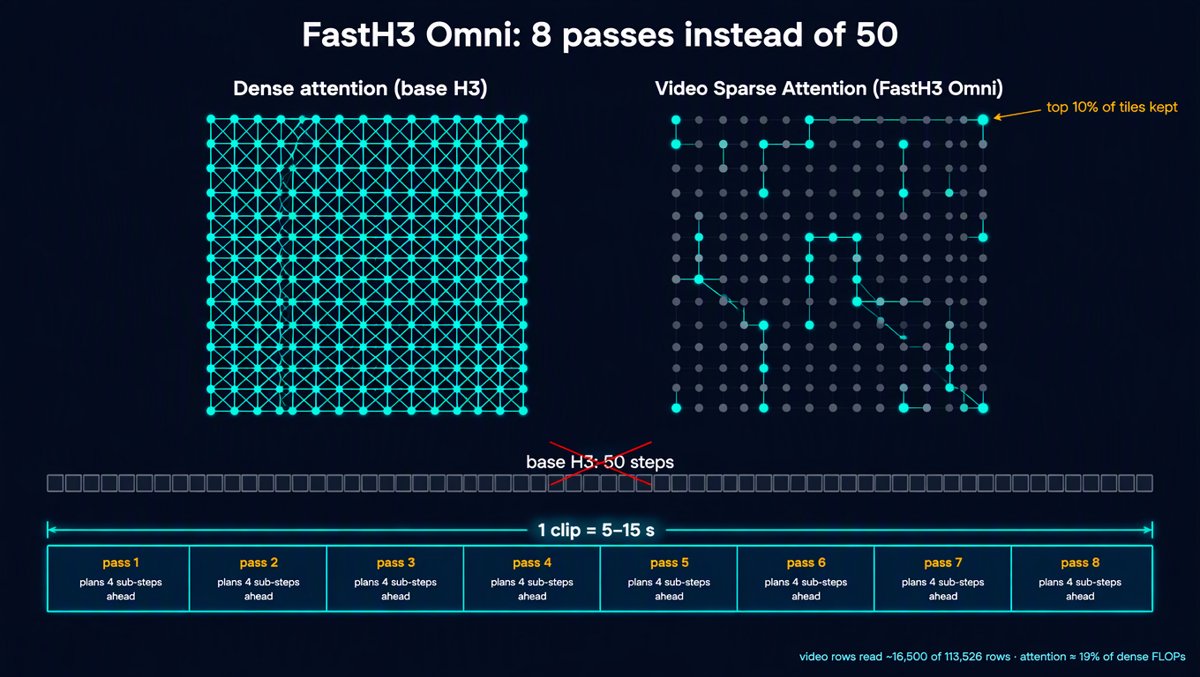
Fewer passes: Parallel Decoding Distillation. The NVIDIA FastGen team's PDD method (Shaul et al., 2026) teaches the model to take 8 strides where it used to take 49 careful steps — and each stride plans four sub-steps ahead. One pass returns an averaged denoising direction over a whole grid interval, so four sub-steps cost one pass. To steer that, the output layer widens from one head to 32 small heads — 44 MB in total, trivially cheap — with video velocity in 96 dimensions and audio in 32 (the exact sizes of the two VAE latents, which is a pleasing detail).
Cheaper passes: Video Sparse Attention. VSA (Zhang et al., 2025) tiles the video rows into 4×4×8 blocks of 128 tokens — 972 tiles for a 15-second clip. A cheap coarse pass scores every query tile against every key tile; each query tile keeps only its top 10% of video tiles and attends to those in full. A video row ends up reading about 16,500 of 113,526 rows, and attention drops to roughly 19% of its dense FLOPs. Here's the catch, though: text, reference, keyframe and audio rows stay dense — every row must read them and they read everything. That dense prefix is why nine image references shrink your speedup toward 6.8×. Every reference you add is a row that never gets sparser. The benchmark table and the architecture agree, which I find deeply satisfying.
The safety net: a gate layer. Skimming risks losing far-away context, and drifting clips are the classic symptom. So each block gained one new layer (to_gate_compress) that compresses a blurry whole-clip summary and a learned gate decides, per row, per head, per channel, how much of it to mix back in. It starts at zero and distillation decides when to use it. Cost: about 10% more linear compute and 1.9 billion parameters. Insurance, itemized.
How to install it
ComfyUI support landed day one with single-file conversions — no custom node package. The workflow template is video_fasth3_ominiref_r2v (added October 20). Files, from the ComfyUI-ready collection:
| File | Size | Notes |
|---|---|---|
| fasth3_omniref_8step_pruned_bf16.safetensors | 44.2 GB | reference quality |
| fasth3_omniref_8step_pruned_int8_convrot.safetensors | 22.2 GB | official template default |
| fasth3_omniref_fp8_comfy.safetensors | 23.1 GB | separate FP8 repo |
| fasth3_omniref NVFP4 QAD conversion | 13.8 GB | Blackwell cards |
| qwen3vl_32b text encoder INT8 | 27.1 GB | BF16 is 51.5 GB; NVFP4 AWQ 15.7 GB |
| minimax_h3_video_vae INT8 | 2.8 GB | BF16 is 5.2 GB |
| minimax_h3_audio_vae FP32 | 0.6 GB | required for generated audio |
The text encoder and VAEs come from the MiniMax-H3 repository — you need access approval on Hugging Face, so request it before you start downloading.
Hardware paths, as the team publishes them:
- RTX 5090 (32 GB) / DGX Spark (128 GB unified): the NVFP4 QAD build — weights trained specifically for NVFP4 execution on Blackwell. Device recipes live in the FastVideo cookbook. Defaults to 480p; the 5090 profile offloads the text encoder and needs a precomputed AdaLN table.
- RTX 4090: the FP8 build with layerwise offload — Ada has no FP4 hardware.
- Everything else (my 16 GB card included): INT8 convrot, the template default. Disk size is not VRAM size; ComfyUI's memory management makes the 16 GB case work, and the community runs it there routinely. GGUF conversions squeeze it onto 8 GB cards if you're brave.
The recipe that worked for me on 16 GB: INT8 model, template defaults, 124 frames, 1344×768, guidance 1.0, shifts 12/3, reference scaling "match". Iterate at that speed; flip to "max" scaling only for the shot that has to be perfect.
The pothole list
Things I'd want someone to have told me first:
- Parity is not proven. The published clips are matched qualitative comparisons — same prompt, references, seed and GPUs — not evidence the outputs are identical to base H3. The blog says so itself.
- Precision changes pixels. FP8 and NVFP4 outputs can differ from BF16, and ComfyUI's own kernels differ from FastVideo/UniServe output. Don't A/B across stacks and blame yourself.
- The dense-prefix tax. References are dense rows; stack nine images plus three clips and your speedup sags toward 7×. Still great — just know the shape of the curve.
- "Max" reference scaling is several times the cost. Reserve it.
- Voice references: community reports that using multiple voice references together is unreliable. One clean timbre reference works best.
- License and gating: MiniMax-H3 Community License, and the checkpoint needs HF access approval. Read both before shipping anything commercial.
Why this one matters
Two reasons this release feels like a line being crossed rather than another point on the curve.
First, the threshold. For fifteen years, "real time" was the phrase video engineers used about other people's hardware. On the server stack it is now simply true for these clip lengths, and the local experience went from kettle-boiling to preview-watching. When iteration gets ten times cheaper, you don't just work faster — you try things you would never have bothered attempting.
Second, the cadence. This is the fourth step in a fast, public ladder: FastH3 Preview v1 (August 27, a 4-step sparse distillation for text-to-video-and-audio), FastH3 V2 (8-step), FastH3 Trim (8 of 50 blocks removed, targeting 8 GB cards), and now Omni, which adds the full reference path at the same 8-step budget. Open distilled models arriving months after the base model, running on consumer cards, with the recipe published — that pattern is becoming the norm, and each rung resets what "slow" means.
Where does that leave my last post's argument — Remotion for deterministic composition, generative models for footage? Unchanged, and stronger. FastH3 Omni sits entirely in the generation lane: it makes footage, with sound, from your references. Remotion and the NXagents workflow cut, caption, sequence and ship it. The pipelines are converging on a division of labor that actually works: generate the raw seconds for tens of dollars of electricity, compose them deterministically for free.
If you've got a 16 GB card gathering dust under a monitor, this is the week to point it at video. Start with one image and a voice sample, five seconds, seed 0, "match" scaling — and enjoy the strange experience of a diffusion model finishing before your coffee does.
Sources: FastVideo/Hao AI Lab release blog and FastH3 Omni model card (Oct 20, 2026); ComfyUI Wiki release write-up; Reactor engineering deep-dive; community reports from r/StableDiffusion and r/comfyui.