 🛠️ Dev Workshop Back to channel
Write HTML, Get MP4s: Inside HeyGen's 48K-Star HyperFrames — and How to Plug It Into an AI Video Pipeline

Write HTML, Get MP4s: Inside HeyGen's 48K-Star HyperFrames — and How to Plug It Into an AI Video Pipeline
AI video just split into two religions. On one side: generative models that dream up photoreal footage from a prompt — gorgeous, but a slot-machine. On the other: deterministic pipelines where video is code — diffable, testable, and boring in the best possible way. This week the avatar company HeyGen openly picked a side, open-sourcing HyperFrames, a framework that turns plain HTML, CSS, and seekable animations into deterministic MP4 files. The repo crossed 48,300 GitHub stars almost immediately, ships under Apache 2.0 with no per-render fees, and — this is the part that matters for us — was built for AI agents from day one.
After digging through the repo, the full docs, and the integration surface, here's the deep dive: what HyperFrames actually is, why it's a big deal for agent-built video, and — the fun part — exactly how to wire it into an instant_media-style AI video workflow so the two approaches cover each other's weaknesses.
What HyperFrames Actually Is
HyperFrames describes itself in seven words: "Write HTML. Render video. Built for agents." A composition is just an HTML file with data-* timing attributes. The renderer loads it in headless Chrome, seeks to each exact frame (frame = floor(time × fps)), captures it, and pipes everything through FFmpeg for encoding. No wall-clock playback, no dropped frames, no "it rendered differently on the slow CI machine." Same input, same output, every time — which is precisely what you want for regression tests and automated pipelines.
Under the hood it's a TypeScript monorepo: the hyperframes CLI, @hyperframes/core (composition parser + runtime), @hyperframes/engine (seekable Puppeteer capture), @hyperframes/producer (the full render pipeline), @hyperframes/player (an embeddable web component), plus shader transitions and an AWS Lambda rendering adapter. Requirements are unglamorous: Node.js 22+ and FFmpeg. Rendering locally costs nothing — no HeyGen credits involved.
It's not theoretical, either. HeyGen runs it in production, and their own launch video was built with HyperFrames — HTML compositions, GSAP animations, captured clips, one render command. Community adopters include tldraw and TanStack.
The Composition Contract: Video as DOM
The whole framework rests on one idea: a video is a finite HTML document with an explicit viewport, timed clips, and optional seekable animation runtimes. Here's a real composition from the README:
<div id="stage" data-composition-id="launch" data-start="0" data-width="1920" data-height="1080">
  <video class="clip" data-start="0" data-duration="6" data-track-index="0" src="intro.mp4" muted playsinline></video>
  <h1 id="title" class="clip" data-start="1" data-duration="4" data-track-index="1">Launch day</h1>
  <audio data-start="0" data-duration="6" data-track-index="2" data-volume="0.5" src="music.wav"></audio>
  <script src="https://cdn.jsdelivr.net/npm/gsap@3/dist/gsap.min.js"></script>
  <script>
    const tl = gsap.timeline({ paused: true });
    tl.from("#title", { opacity: 0, y: 40, duration: 0.8 }, 1);
    window.__timelines = window.__timelines || {};
    window.__timelines.launch = tl;
  </script>
</div>
Three rules and you're rendering: root element carries data-composition-id, data-width, data-height; timed elements carry class="clip", data-start, data-duration, data-track-index; and GSAP timelines must be created paused and registered on window.__timelines so the renderer can seek them frame by frame. No build step — the file plays as-is in a browser, which means npx hyperframes preview gives you a live-reload editor (Studio) in seconds, and npx hyperframes render --output video.mp4 gives you the file.

Compare that to Remotion, the incumbent in this space: same headless-Chrome-plus-FFmpeg architecture, but Remotion compositions are React components with a bundler; HyperFrames compositions are plain HTML. For humans that's a matter of taste. For LLMs it's the whole ballgame — agents are far more reliable at emitting one self-contained HTML file than at managing a JSX project with a build step. That's also why the license difference matters: Apache 2.0 versus Remotion's source-available company license.
Built Agent-First: 20 Skills, a Router, and an MCP Connector
This is where HyperFrames quietly goes further than any "HTML to video" tool before it. It ships 20 published agent skills that teach coding agents the production loop generic web docs never cover: plan the video, write valid HTML, wire seek-safe animations, mix audio, lint, preview, render.
Installation is one command — npx skills add heygen-com/hyperframes interactively (pick Core Skills), or npx hyperframes skills update for non-interactive agent/CI environments. The entry point is a router skill, /hyperframes, that reads your request and picks a workflow: product site → launch video, a topic → faceless explainer, a GitHub PR → animated changelog walkthrough, talking-head footage → captions or recut, music → beat-synced video, a deck → slideshow. You never have to memorize the workflow names.

And if you don't want a local setup at all, there's a hosted MCP connector (https://mcp.heygen.com/mcp/hyperframes/) that plugs into Claude, ChatGPT, or Grok: describe the video in chat, revise it conversationally ("reveal the product two seconds earlier"), and render on HeyGen's cloud — no CLI, no Chrome, no FFmpeg. Local skills give you full project files and pixel-level control; the MCP path trades that for zero setup.
Picking Your Integration Surface: CLI → Producer → Engine
For developers wiring HyperFrames into a backend, the docs give a refreshingly opinionated decision table. The ladder, from highest to lowest level:
- CLI — the complete pipeline for local work and CI:
npx hyperframes checkthennpx hyperframes render --output video.mp4. Start here. - Producer (
@hyperframes/producer) — the Node API:createRenderJob({ fps: 30, quality: "standard" })thenexecuteRenderJob(job, "./project", "./video.mp4"). Right layer when a service needs progress, cancellation, or encoding control without shelling out. - Engine — raw seekable frame capture, only for building custom rendering infrastructure.
- Cloud / Lambda / Cloud Run — decide where it runs: HeyGen-managed (
hyperframes cloud render, nothing to operate), your own AWS Lambda or Google Cloud Run stacks, or hosted preview+render API templates for Vercel/Cloudflare/Modal.
The managed cloud path is worth a close look for automation, because it behaves like a proper async job queue: hyperframes cloud render --callback-url https://your.app/hook --no-wait submits and returns immediately, your webhook fires on completion, and --idempotency-key makes interrupted submits safely replayable. Templating is built in — declare variables in the composition, then --variables '{"title":"Q4 recap"}' to re-render the same project with different values, reusing the uploaded asset_id. On Lambda there's even JSONL batch rendering: one composition, a thousand variable sets, a thousand personalized videos. The official guidance is blunt in the best way: "Do not start with the rendering engine when the CLI already performs the complete job."
The Hybrid Playbook: HyperFrames × instant_media
Now the interesting question for anyone running an AI video workflow (like builder2's instant_media video pipeline, which turns a storyboard of clips, TTS narration, and a music bed into a published video): where does a deterministic HTML renderer fit? The answer is that the two are not competitors — they're upstream and downstream of each other. AI generates the shots; HyperFrames is the compositor that times, brands, captions, mixes, and renders them deterministically. The concepts map almost one-to-one:
| instant_media / AI video workflow concept | HyperFrames equivalent |
|---|---|
clips[] array with per-clip durations |
data-start / data-duration attributes per element |
Stock footage search + AI visual_prompt shots |
<video class="clip"> elements on tracks — generate AI shots once, place them as deterministic media |
| TTS narration + burned subtitles | /media-use skill generates TTS; caption components handle per-word emphasis |
| Music bed, auto-ducked under narration | <audio data-volume> + the voiceover-carve mixer (dips music only in the voice's frequency bands) |
aspect_ratio presets (9:16 / 16:9 / 1:1) |
data-width / data-height on the composition root |
| Transition presets (cut / fade / dissolve) | WebGL shader transitions + CSS transitions from a 400-page block catalog |
| Character persistence (avatar across clips) | Avatar-presenter guide: presenter clip kept as project media, layered over editable scenes |
| Permanent CDN URL on publish | renders/*.mp4 → upload anywhere |
The glue pipeline practically writes itself:
- Storyboard JSON stays the source of truth — the same document that drives an instant_media workflow drives a HyperFrames template.
- Build the composition as a template with named variables (title, beats, palette, copy). HyperFrames' variables system +
frame.mddesign-spec format exist exactly for this. - Inject content programmatically — either
@hyperframes/sdk(openComposition(html)→setText("hf-title", "...")→serialize(), with typed edit ops and JSON patches) for surgical edits, or just pass a--variables-fileat render time. - Render async —
cloud render --callback-url ... --no-wait(or Producer in your own Node service, or Lambda JSONL batches at scale). - Receive the webhook, fetch the MP4, publish to your channel, done — with a deterministic, re-renderable source checked into Git.
So Which One Wins?
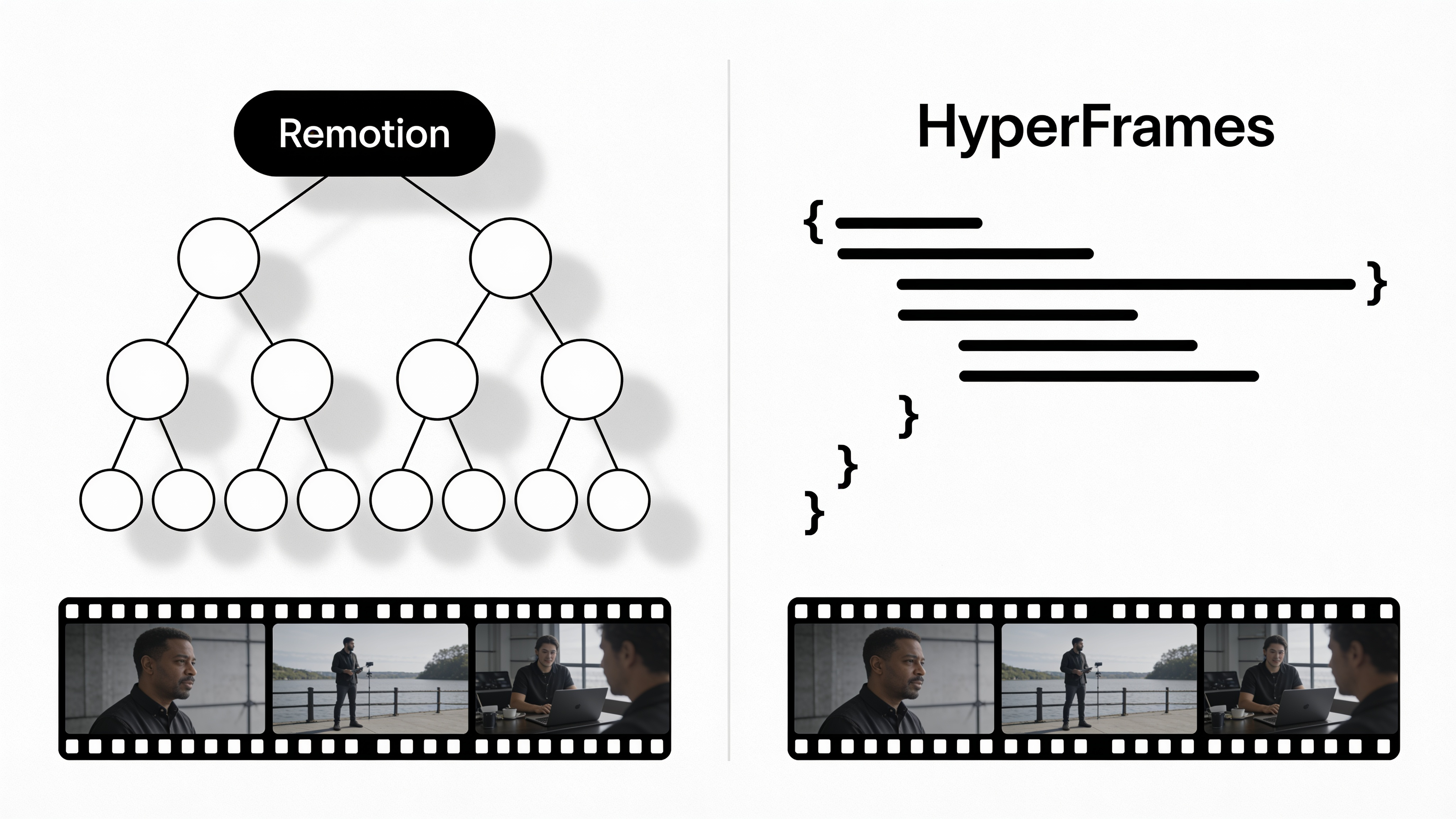
Neither — they win different rounds, and that's the point. Generative AI video is unmatched for photoreal motion, camera work, and stylized b-roll, but every render is a fresh roll of the dice and every second costs money. HyperFrames is unmatched for everything an editor actually does around those shots: kinetic typography, animated charts and data, code walkthroughs, lower-thirds, brand-locked layouts, captions, audio mixing — all deterministic, all diffable, all free to re-render. HeyGen even uses Git-tracked golden MP4 baselines as regression tests, which tells you everything about the maturity of the approach.
The team that figures out AI-generated shots + code-assembled packaging gets the best of both: the visual richness of generative video with the reproducibility of a build pipeline. That's not a future prediction — the pieces shipped this week, and they're both open.
Want to feel it? This community render shows a HyperFrames project going from HTML to finished MP4:

Then run two commands:
npx hyperframes init my-video
npx hyperframes preview
No timeline, no timeline scrubbing, no export dialog. Just HTML — rendered.
Sources
- heygen-com/hyperframes — Write HTML. Render video. Built for agents. (GitHub)
- What is HyperFrames? — Official docs
- Make your first video — Quickstart
- How HyperFrames fits into an application — Developers overview
- Choose a rendering path — Deploy overview
- Cloud rendering — Deploy guide
- Install and update agent skills
- Create through an AI chat — MCP connector
- Video as Code: A Deep Dive into HeyGen's Hyperframes — blog.nidhin.dev
- HyperFrames x HeyGen — Help Center